Your guests
become
your DJs.
JukeboxBattle is the interactive video jukebox for bars, restaurants and events. Your guests vote from their phones, and the leaderboard updates live on your TV screen. No app, no friction.
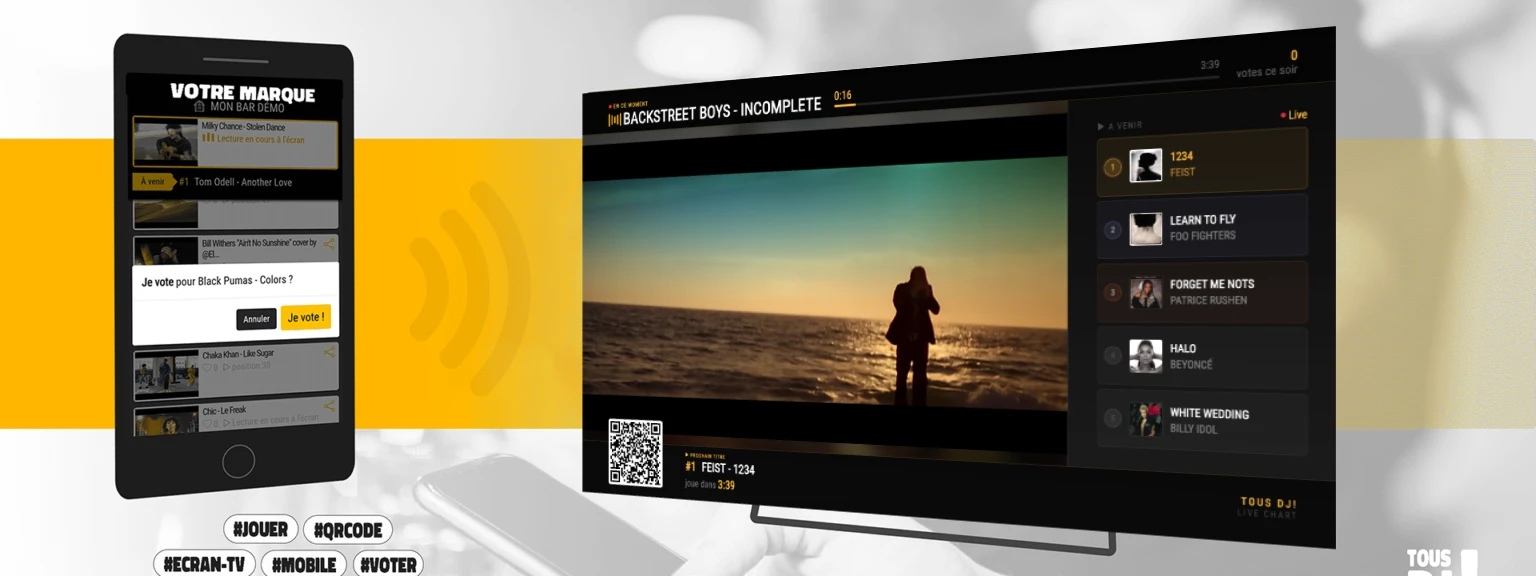
Understood in 30 seconds.
You set it up
Create your YouTube playlists from the admin interface. Add tracks in a few clicks, organize by vibe.
They scan
Your guests scan the QR code on screen. No app, no sign-up — just their phone and a browser.
Best wins
Votes update live on the TV screen. The track with the most votes moves to the top of the queue and plays first.
Everything you need,
nothing you don't.
Built for venue owners who don't have time. A clean interface, fast setup, and results you'll see on the very first night.
Live Chart in real time
The vote rankings update dynamically on your TV screen. Guests see their vote impact the leaderboard the moment it's cast.
No app to vote
A QR code is all it takes. Guests open a web page on their phone and vote instantly. Zero friction at entry.
Unlimited YouTube library
Add any YouTube video or playlist by pasting the URL. Thousands of tracks available in seconds.
Live Dashboard
Control your jukebox in real time from your smartphone: current playlist, next track, skip, switch playlist on the fly.
Shared Playlists
Create playlists shared across all your venues. Update once, available everywhere. Perfect for chains and groups.
Player customization
Upload your logo, choose your TV skin (V1 standard or V2 Live Chart), and customize the look to match your brand.
Built-in billing
Manage your subscription and download invoices directly from your account — no third-party provider needed.
Automatic transitions
Audio fade, next track display, continuous playback without interruption. Your jukebox runs autonomously all night long.
Blind Test
Launch a blind test in one click: the title is hidden, guests guess live. A turnkey game to liven up your nights.
Up and running in
minutes.
No server to manage, no technician needed. A TV, an internet connection, your ISP set-top box or a TV stick — that's all.
Download the app on your set-top box or HDMI TV stick
If you don't have a set-top box, plug your HDMI stick into your TV. Open the app store and search for JukeboxBattle, then install the app.
Compatible: Amazon Fire TV Stick 4K (and above) · Google Chromecast HD (and above)
Create your account
Sign up online in 2 minutes. Choose your plan, enter your details — your admin dashboard is immediately available.
Create my free accountPair your screen with your account
On first launch, the app displays a pairing code on the TV screen. Enter this code in your admin dashboard under My account → Pairing.
Build your playlists
From the admin interface, search for your YouTube tracks, create playlists by mood and set the play order. Your jukebox starts automatically.
You're live — your guests take control
The QR code appears automatically on screen. Guests scan and vote. Rankings update in real time. You don't have to do anything else.
Your guests' mobile interface
Simple and transparent.
Start for free, no credit card required. Monthly subscription with automatic renewal, cancel anytime from your account.
- Unlimited playlists
- QR code mobile votes
- TV Live Chart
- Blind Test
- All features included
- Unlimited playlists
- QR code mobile votes
- TV Live Chart
- Blind Test
- Priority support
Secure payment by Stripe · Multi-venue pricing on request
A question? Let's talk.
Tell us about your venue and your needs. We get back to you quickly.